Tech Mahindra Work From Home Jobs 2026 | Online Jobs For 12th Pass | Remote Jobs For Housewives

Tech Mahindra Work From Home Jobs 2026 | Online Jobs For 12th Pass | Remote Jobs For Housewives Job description: […]

Tech Mahindra Work From Home Jobs 2026 | Online Jobs For 12th Pass | Remote Jobs For Housewives
Job description:

  • Customer Support Associate – Tech Mahindra – Work from Home
  • Candidates should have the below system configuration
  • Government Laptop not eligible
  • Laptop with i5&Ryzen&above processor 7th gen, 10 +GB RAM, and Windows 10/10Pro/11/11 Pro OS
  • – Broadband/wifi internet connection
  • – Net speed of 20 mbps or above.
  • Candidates should join the interview only using laptop
  • Nature of Job: Domestic BPO Voice Inbound (Contractual Role)
  • Process: E-COMMERCE
  • Shift: Rotational Shift and Rotational Week Off
  • Working Days: 6 days a week
  • Working Hours: 9 hrs. of login (8 hrs. productivity + 1 hr. break)
  • Language Requirements: Regional Language: Malayalam & Average English, ability to read
  • Eligibility: Both Fresher and Experienced candidates
  • Qualification: Graduation in any degree & Undergraduate
  • Age -up to 30

Salary :

  • Fresher – 13900 Rs Take home
  • Experience (min 6 months) – 15700 Rs Take home

Interested candidates and who are all having above mentioned system requirements can join this meeting for interview.

Contact:

Deepika: 6381937082

Google meeting link for virtual interview :

https://meet.google.com/tfi-cupi-iuu

Interview timing 10am to 6pm
 

Job Description

Organaization

TECH MAHINDRA

Post Name

Customer Support Associate

Job Type

Work From Home

Job Role

Bilingual / Multilingual Support - Voice / Blended

Job Openings

100

Department

Customer Success Service & Operations

Employment Type

Full Time / Permanent

Education

Any Graduate, UnderGraduate

Age Limit

+18 Years

Experience

Experienced, Freshers

Salary

13,900/- - 15,700/-

Package

1.75-2 Lacs P.A.

Location

Remote

Last Date

ASAP

Interview Modes

Online, Google Meet, On Call, Telephonic

Hiring Office

Chennai

Shift Hours

9 Hours Shift Including 1 Hour Break

ShiftsType

Rotational Shifts, Night Shifts

Week's Off

6 Days Working 1 Day Off

Equipment

Laptop / Wifi / Light Backup

Company Address

Company Info Address: SBC Tech Park, MTH Road, Ambattur, Chennai, Tamil Nadu 600058

Official Website

https://www.techmahindra.com/

About Company

Tech Mahindra is a global consulting service and systems integrator that operates in over 90+ countries, delivering solutions with a unique blend of digital innovation and robust, industry-strong processes

How To Crack Interview

How to Crack Interview
  • Identify the core skills the employer needs and prepare real-life examples that prove you have them.

  • Study their products, services, mission statement, and recent news to show you are genuinely interested.

  • Structure your “Tell me about yourself” by focusing on your background, your current skills, and your future career goals.

  • For behavioral questions, explain the Situation, the Task, your specific Action, and the positive Result.

  • Mention a real professional weakness, but immediately explain the steps you are taking to improve it.

  •  For WFH roles, ensure a quiet background, stable internet, and look directly into the camera to simulate eye contact.

  • Wear professional attire that fits the company culture, even if the interview is conducted via video call.

  • Pay close attention to the interviewer’s questions; wait for them to finish speaking before you begin your answer.

  • Show your enthusiasm by asking about the team’s goals, the work culture, or the next steps in the hiring process.

  • Use numbers and data (e.g., “Handled 50+ calls daily” or “Improved team efficiency by 20%”) to make your success more believable.

  • Send a professional “Thank You” email after the interview to reiterate your interest and express gratitude for their time.

  • Maintain a confident posture and a positive tone throughout the conversation, even when faced with difficult questions.

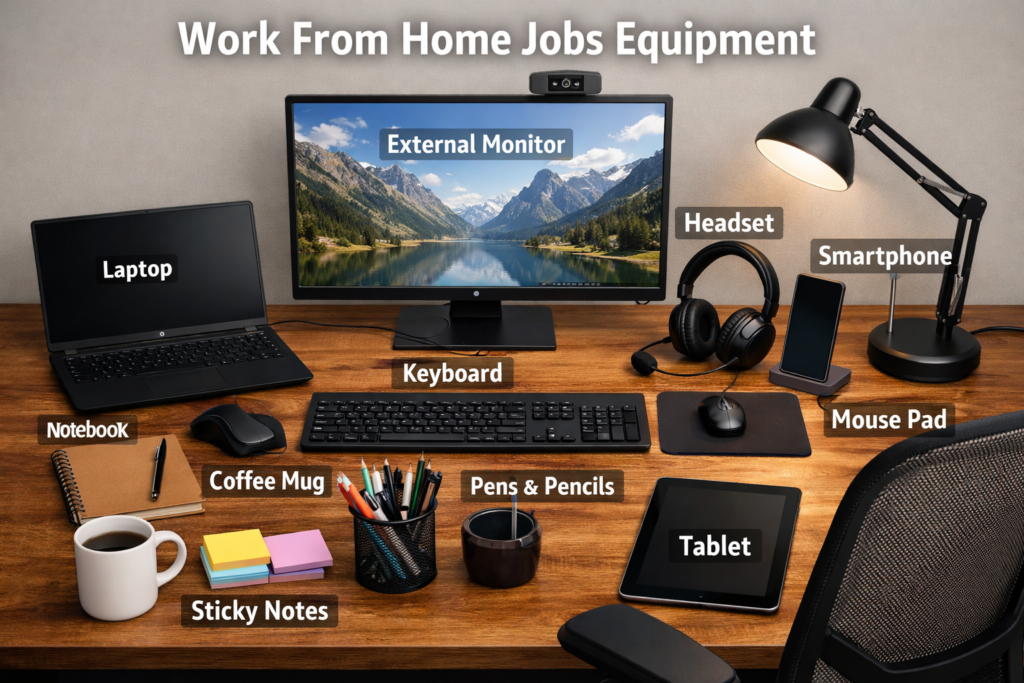
Work From Home (WFH) Equipment

  • High-Speed Broadband: A stable internet connection (minimum 30-50 Mbps) for video calls and data tasks.
  • Laptop or Desktop: A reliable system with at least an i5 processor and 8GB of RAM for smooth multitasking.
  • Noise-Canceling Headset: A dedicated headset with a built-in microphone to block background noise during meetings.
  • Power Backup (UPS/Inverter): Essential for your Wi-Fi router and laptop to ensure connectivity during power cuts.
  • Internet Backup: A secondary source like a mobile hotspot or 4G/5G dongle for emergency outages.
  • Ergonomic Office Chair: A chair with proper back (lumbar) support to prevent pain during long working hours.
  • Dedicated Work Desk: A clean, flat surface specifically for work to maintain a professional environment.
  • HD Webcam: A 720p or 1080p camera for clear visibility during virtual interviews and team meetings.
  • Laptop Stand: To keep the screen at eye level and maintain a healthy sitting posture.
  • External Mouse and Keyboard: For faster navigation and to reduce strain on your wrists.
  • Laptop Cooling Pad: To prevent your device from overheating during continuous usage.
  • Surge Protector/Extension Board: To safely plug in multiple devices and protect them from voltage spikes.
  • Proper Lighting: A desk lamp or ring light to ensure you are clearly visible on camera.
  • Blue Light Glasses: To protect your eyes from digital strain caused by long hours of screen time.

How to Apply ? For This Role Step by Step Guide

🧑‍💻 1. Create Your Naukri Profile (Register)

  1. Go to https://www.naukri.com on your web browser or open the Naukri mobile app.
  2. Click Register / Sign Up.
  3. Choose whether you’re a Fresher or an Experienced candidate.
  4. Enter your email, mobile number, and other required details; set your password.
  5. Confirm your email/mobile via OTP if prompted. 👉 This creates your Naukri account.

📝 2. Complete Your Profile

  1. A complete profile increases chances of being contacted by recruiters:
  2. Upload your resume (PDF or Word).
  3. Add education, work experience, skills, preferred job locations, and salary expectation.
  4. Write a clear headline and career summary.
    ➡ Recruiters use this profile to shortlist candidates.

🔍 3. Search for Jobs

  1. On the homepage, find the Search bar.
  2. Type relevant keywords like job title, skills (e.g., “Software Engineer”, “Java”), or company name.
  3. Enter location where you want to work (e.g., “Lucknow, Uttar Pradesh”).
  4. Click Search.
  5. Use filters like Experience, Salary, Industry, Job Type to narrow results.
    👉 Each job listing will show a brief description in the results.

📄 4. Review Job Details Click on a job title to see:

  1. Job description
  2. Required skills
  3. Experience & salary range
  4. Company details
    Make sure your qualifications and experience fit the job.

📤 5. Apply for the Job ➤ If you see “Apply” button:

  1. Click it to submit your profile and resume directly to the recruiter.
  2. Some jobs may show a questionnaire — answer it before submitting.
  3. ➤ If you see “Apply on Company Website”:
  4. You’ll be taken to the company’s own career page to complete their application form.

📊 6. Track Your Applications After applying:

  1. Go to My Naukri → Application Status / Applied Jobs to see the status of each application.
  2. You may see statuses like Application Sent, Viewed, Shortlisted, Job Expired, etc.

⭐ Tips for Better Results

  1. ✔ Apply soon after jobs are posted (early applications get better attention).
  2. ✔ Customize your resume for each job role.
  3. ✔ Keep your profile updated regularly.
  4. ✔ Save interesting jobs and apply later if needed.
  5. ✔ Set job alerts to receive matching jobs by email.

Our Social Media Handles

YouTube Channel

About Pragya

Hi, I’m Pragya, the founder of JobWithPragya. I am a career mentor and digital content creator dedicated to helping freshers and students find legitimate Work-From-Home (WFH) and private sector jobs. Every job alert on this website is manually verified for authenticity to ensure you stay safe from recruitment scams. My mission is to provide you with the right guidance and resources to kickstart your career.

Latest Job Updates

FAQ

A: We regularly update both our website (jobwithpragya.in) and YouTube channel (jobwithpragya2.0) with the latest WFH and WFO opportunities for freshers.

A: Yes, we carefully check the details before sharing any opportunity to ensure authenticity. However, we recommend candidates to do their own verification before applying.

A: No, we do not guarantee or provide direct placements. Our role is only to inform students and candidates about available job opportunities.

A: No, all job updates on our website and YouTube channel are completely free to access.

A: We provide paid PDF guides for interview preparation, which include commonly asked questions, tips, and strategies to help freshers perform better in interviews.

A: Since these are digital products, all sales are final and non-refundable.

A: Currently, our focus is on job opportunities within India. We may expand to international updates in the future.

Index
Scroll to Top