
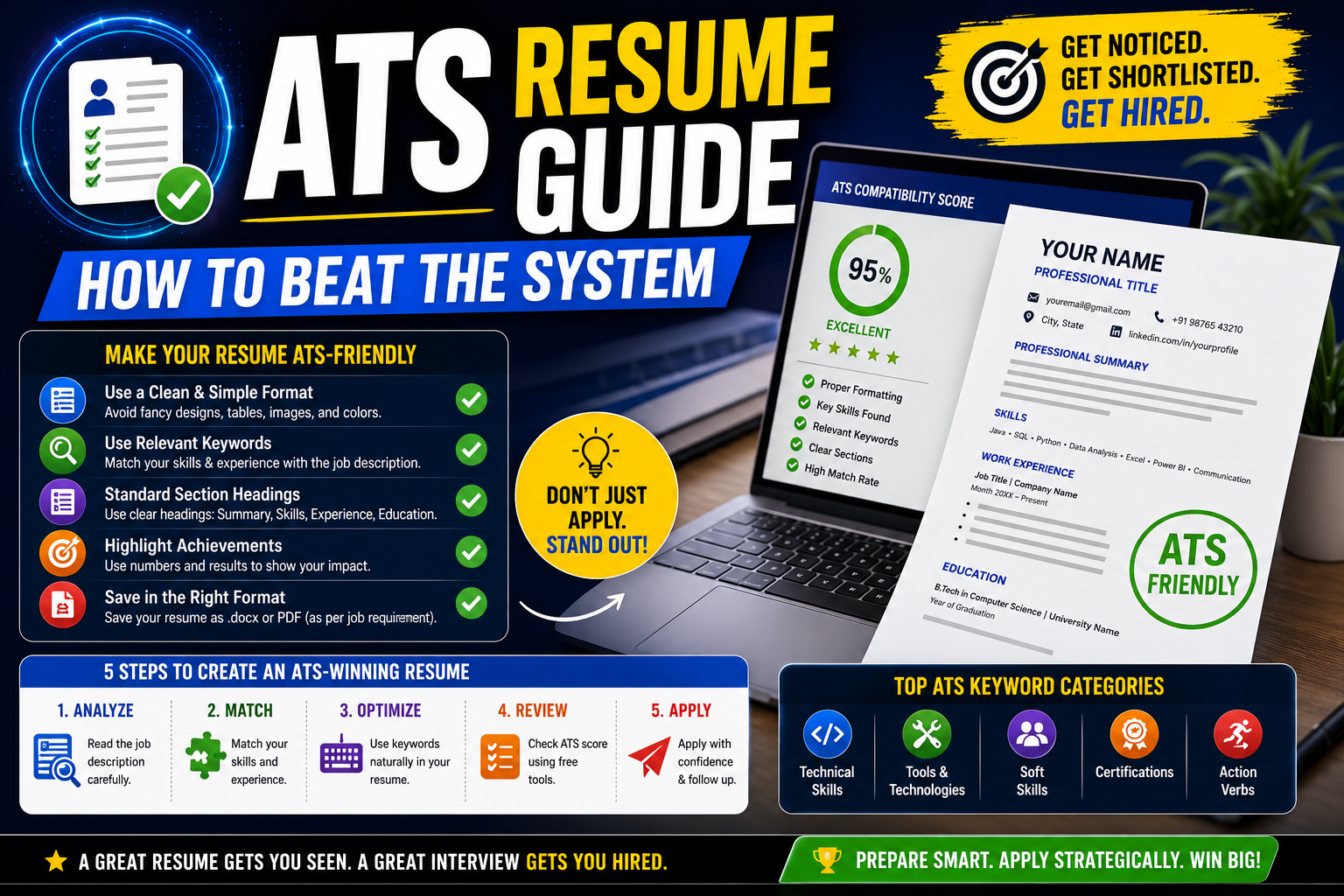
You spent two hours perfecting your resume. You applied to 50 jobs on Naukri and LinkedIn. But you didn’t get a single call. Not one. It’s not because you’re unqualified. It’s because no human ever saw your resume. A software rejected it before any recruiter could read it.
That software is called ATS — Applicant Tracking System. And if your resume isn’t built for it, you’re invisible.
In this article, I’ll explain what ATS is, how it works, and exactly how to make your resume ATS friendly so it actually reaches a real person.
What is ATS and Why Does It Matter for Your Resume
ATS stands for Applicant Tracking System. It’s a software that companies use to filter resumes before a human reviews them. Think of it as a gatekeeper.
When you apply online — whether it’s Infosys, TCS, Flipkart, or a Bangalore startup — your resume first goes through ATS. The software scans it for relevant keywords, qualifications, and formatting. If your resume matches the job description, it moves forward. If it doesn’t, it gets rejected automatically.
Here’s what most Indian job seekers don’t realize. According to a 2024 Jobscan report, over 98% of Fortune 500 companies use ATS. In India, almost every company that hires through Naukri, LinkedIn, or their own career portal uses some version of it.
A fresher in Pune once told me he applied to 200+ jobs in three months with zero response. His resume had a beautiful two-column design with icons, graphics, and a profile photo. It looked great to human eyes. But ATS couldn’t read any of it. The software saw a jumbled mess of broken text. Every single application was dead on arrival.
Your skills don’t matter if ATS can’t read them.
Best ATS Friendly Resume Format for Indian Job Seekers
Let me tell you exactly what an ATS compatible resume looks like. It’s simpler than you think.
Use a single-column layout. Two-column or multi-column designs confuse ATS. The software reads left to right, top to bottom. Multiple columns mix up your content. Your work experience might end up merged with your skills section.
Stick to standard section headings. Use “Work Experience” — not “My Journey.” Use “Education” — not “Where I Learned.” Use “Skills” — not “What I Bring to the Table.” ATS looks for standard headings. Get creative elsewhere, not here.
Use ATS friendly fonts. Calibri, Arial, Times New Roman, Georgia, or Helvetica. These render cleanly in every ATS. Avoid decorative fonts like Papyrus, Comic Sans, or any custom downloaded font.
No images, icons, logos, or graphics. ATS cannot read images. That skill bar showing “Python — 90%” is invisible to the software. Write it as plain text instead — “Python (Advanced).”
No headers or footers for important info. Many people put their phone number or email in the header. Some ATS skip headers entirely. Put your contact details in the main body of the resume.
Here’s a simple format that works for freshers and experienced professionals in India:
| Section | What to Include |
|---|---|
| Contact Info | Name, phone, email, LinkedIn URL, city |
| Professional Summary | 2-3 lines about your experience and key skills |
| Skills | List of relevant skills (match with job description) |
| Work Experience | Company name, role, dates, bullet point achievements |
| Education | Degree, college, year of passing, percentage/CGPA |
| Certifications | Relevant certifications with issuing body |
That’s it. No photo. No fancy borders. No colour blocks. Clean and readable.
How to Optimize Your Resume for ATS — Step by Step
Follow these 5 steps before your next job application. Each one directly improves your ATS score.
Step 1: Read the job description carefully.
ATS matches your resume against the job posting. Open the job description. Highlight the key skills, tools, and qualifications mentioned. If it says “proficiency in Excel and SQL” — those exact words should appear in your resume.
Step 2: Add relevant keywords naturally.
Don’t just dump keywords randomly. Place them in your Skills section and within your Work Experience bullet points. For example, if you’re applying for a digital marketing role in Mumbai, include terms like “SEO,” “Google Analytics,” “content marketing,” and “social media management” — but only if you actually have those skills.
Step 3: Use the right file format.
This is where many people go wrong. Some ATS handle PDFs well. Others prefer .docx (Word format). Unless the job posting specifically says PDF, submit in .docx — it’s the safest choice. If the portal gives you format options, always pick .docx first.
Step 4: Check your resume with an ATS score checker.
Free tools like Jobscan, Resumeworded, and SkillSyncer let you compare your resume against a job description. They show your ATS match score and tell you which keywords are missing. Aim for 70% or above. A fresher in Hyderabad improved her callback rate from 0% to 15% just by optimizing her resume from a 38% score to 82% using Jobscan.
Step 5: Save with a professional file name.
Don’t save it as “Resume_final_v3_NEW.docx.” Save it as “Rahul_Sharma_Resume.docx.” Some ATS display the filename to recruiters. Keep it clean and professional.
Common Resume Mistakes That Get You Rejected by ATS
Mistake 1: Using Canva or graphic templates.
Those beautiful Canva resume templates with colour bars, icons, and infographics? ATS breaks them completely. The text gets scrambled. Your “3 years of experience in Java” might read as “3 yea rs ofe xperience in Ja va.” Use Google Docs or Microsoft Word instead. Pick the plainest template available.
Mistake 2: Writing skills that don’t match the job description.
A candidate in Delhi applied for a content writing role. His resume listed “C++, Java, AutoCAD” in the skills section because those were from his engineering days. ATS looked for “content writing, SEO, WordPress” — found none — and rejected him. Tailor your skills to each job. One generic resume for all jobs doesn’t work anymore.
Mistake 3: Using tables and text boxes.
Tables look neat to humans. But many ATS cannot read content inside tables or text boxes. The data either gets ignored or extracted in the wrong order. If you must organize information, use simple bullet points and line breaks.
Mistake 4: Spelling out acronyms without including the short form (or vice versa).
If you write “Search Engine Optimization” but the job description says “SEO,” the ATS might not connect the two. Always include both — write “Search Engine Optimization (SEO)” — so you’re covered either way.
Frequently Asked Questions
Q1: How does ATS scan a resume?
ATS parses your resume into structured data — it extracts your name, contact info, skills, experience, and education. Then it compares these against the job description using keyword matching. Resumes with higher keyword matches rank higher. If your formatting is broken, ATS can’t parse it properly and your score drops.
Q2: Can ATS read a PDF resume?
Most modern ATS can read text-based PDFs. But image-based PDFs — like those created by scanning a printed resume — are completely unreadable. If you’re unsure, submit a .docx file. It’s universally compatible with every ATS. When the job posting specifically asks for PDF, then use a text-based PDF.
Q3: How to check my resume’s ATS score for free?
Use free tools like Jobscan (limited free scans), Resumeworded, or SkillSyncer. Paste your resume and the job description. The tool gives you a match score and highlights missing keywords. Aim for 70% or higher before applying. Even one round of optimization makes a noticeable difference in callbacks.
Q4: Why am I not getting calls despite applying everywhere?
The most common reason is your resume isn’t ATS friendly. Fancy formatting, missing keywords, or wrong file format — any of these can get you auto-rejected. Other reasons include applying to roles that don’t match your profile, or having a generic resume that isn’t tailored to specific job descriptions.
Q5: Should I add a photo to my resume in India?
No. Don’t add a photo to your resume. ATS cannot process images — your photo takes up space that could have text. It also introduces unconscious bias. Unless a job explicitly asks for a photograph (rare in India), skip it entirely. Use that space for a strong professional summary instead.
Your Resume Deserves to Be Seen
Here’s the truth — you might be the most qualified person for the job. But if ATS can’t read your resume, the recruiter will never know you exist.
Keep your resume simple. Use a single-column layout. Match your keywords to the job description. Check your score with a free ATS checker before you hit apply.
It takes 30 minutes to fix your resume for ATS. That small effort can be the difference between silence and an interview call. Open your resume right now, apply these changes, and start getting the responses you deserve. 💪
